Meta's In-App Autofill Skips Your Landing Page. Here's What It Does to Lead Gen.
Someone taps your Meta ad, the page opens on your form, and Meta's browser offers to fill it in. Meta never announced this, so there is no release date. Here is what we can verify, what it likely does to your lead flow, and how to check your own numbers.
Quick summary
- What changed: a tap on a Meta ad lands people on the form itself, and Meta's in-app browser offers to fill it with their saved contact details. We reproduced it in the Facebook app on iPhone (screenshots below).
- Release date: none published. No Meta announcement, no Business Help Center entry, nothing on metastatus.com.
- Advertiser control: none reported for website forms. People can turn autofill off in their own Facebook or Instagram browser settings. You can't turn it off for them.
- Who's exposed: anyone sending Meta clicks to a form on their own site: insurance, home services, education, legal, finance, B2B demos.
- First check: split your in-app browser form fills from the rest and compare time to submit and contact rate before and after.
What changed
When someone taps a link inside Facebook or Instagram, the page opens in Meta's own in-app browser, not in Safari or Chrome. That browser has had an autofill feature for years. Meta's help page describes it this way:
Meta, "How we use autofill"
"It stores contact and payment information to automatically fill in forms on your devices on Facebook, Instagram or other Meta technologies such as Meta Quest Browser."
The same page says Meta collects data about form structure "helping us accurately recognize forms for autofilling," and that contact details entered in a form "will be shared with the website or business after you submit it."
What's new, according to a write-up by marketer Etgar Shpivak, is how far it now goes on ad clicks. A tap on the ad takes the person straight to the form on your page, and the browser offers to fill it in from their profile. His read: leads arrive faster, they are often lower quality, and advertisers have no way to switch it off.
We reproduced it
We tapped a home improvement lead gen ad in the Facebook app on an iPhone. The landing page opened on its form. Before we typed anything, the in-app browser slid up a sheet asking "Autofill with saved info?" with a name, an email and a phone number, and two buttons: Autofill and Not now.
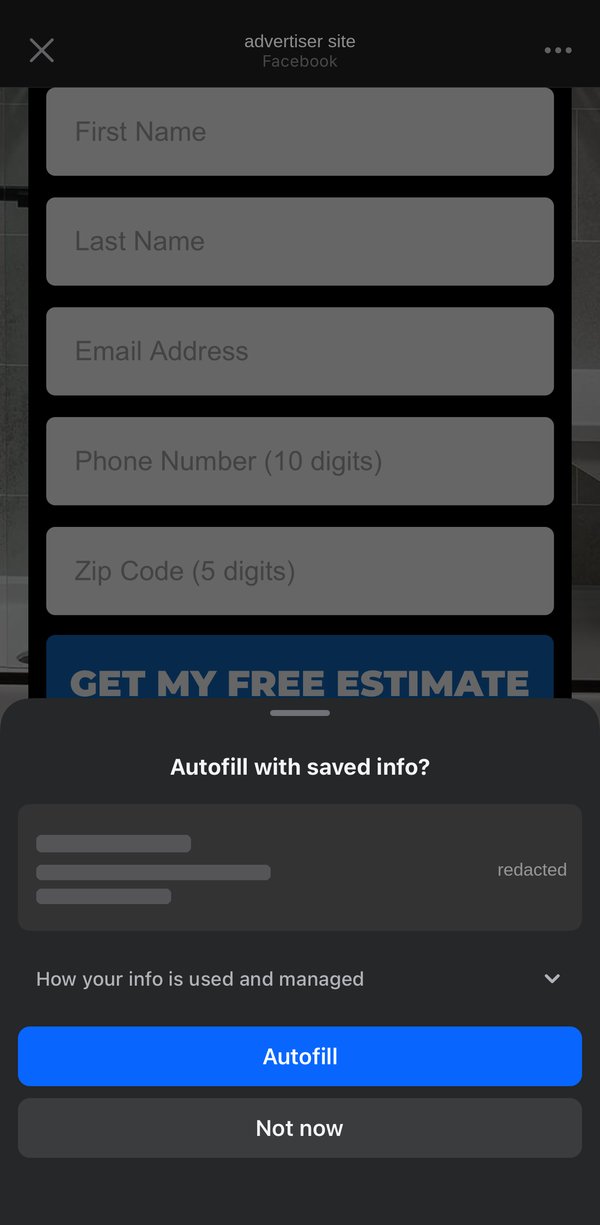
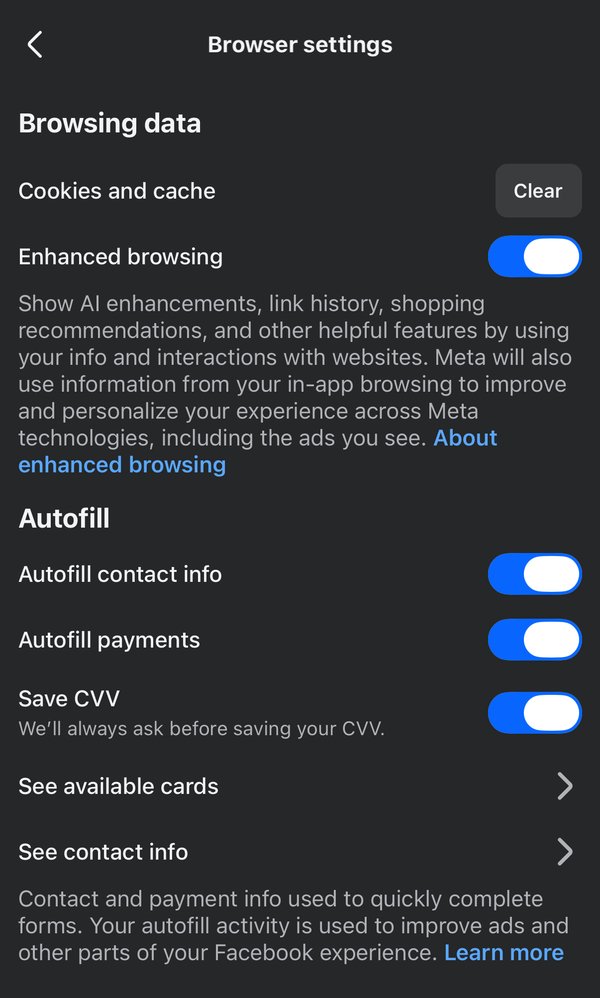
Three details from the test matter for lead gen:
- The saved data didn't fit the form. The form asked for a 10-digit US phone number. The saved number Meta offered was a non-US number with a country code. Meta offered it anyway; whether it gets through depends on your form validation.
- Autofill offered data for three of the five fields. The sheet offered name, email and phone. It did not offer the zip code the form also asked for.
- The sheet hid the bottom of the submit button and everything below it. That is where many lead gen pages put their consent text.
The browser settings also say what Meta does with it. Under Autofill: "Your autofill activity is used to improve ads and other parts of your Facebook experience." Under Enhanced browsing: "Meta will also use information from your in-app browsing to improve and personalize your experience across Meta technologies, including the ads you see." All three autofill switches were on in our test account. We can't tell whether they are on by default for everyone.
This is one test on one iPhone in the Facebook app. Meta rolls out in-app browser changes gradually, so check Instagram and Android too (steps below).
When did it launch?
We looked for a release date and found none. Meta ships in-app browser changes inside app updates, and it does not post them on its status page or in the Business Help Center changelog. What we can date are the building blocks:
| When | What |
|---|---|
| August 2022 | Researcher Felix Krause shows the Facebook and Instagram iOS in-app browsers inject JavaScript into every site they open, ad clicks included. Meta says the code is there "so that we can aggregate conversion events from pixels." (The Register) |
| June 2023 | Meta announces the Instant Form browser add-on: an opt-in Meta lead form that sits at the bottom of your landing page inside the in-app browser, with autofill. (Jon Loomer) |
| 2025 | Meta tests a switch that lets advertisers turn off autofill for email and phone fields on Instant Forms, because profile data is often out of date. It covers Meta's own forms, not your website. (Jon Loomer) |
| 2026 | Practitioners report ad clicks landing directly on website forms with Meta's autofill offered, and no advertiser setting to stop it. We reproduced it in the Facebook app on iPhone. No announcement from Meta. |
Practical answer: date it from your own data. The first day your in-app browser traffic shows a sharp drop in time to submit is your launch date. It can differ by country, app and OS.
What it does to a lead gen funnel
A lead gen landing page is built in a set order: the promise, the proof, the qualifier, then the form. Jumping to the form and pre-filling it breaks that order. These are the effects to look for. None of them is measured across the market yet, so treat them as hypotheses to test in your account.
People never see your page
The headline, the offer, the "who this is for" and the reasons to trust you all sit above the form. If the page opens on the form, that copy is never on screen. Some people submit without knowing what they asked for. Others don't understand what they're looking at and leave. Both show up as worse numbers: a lead with no intent, or a session that ends at the first screen.
Autofill makes submitting effortless, not meaningful
One tap fills name, email and phone. That should raise submit rate and lower cost per lead in Ads Manager, which looks like a win. But profile contact details can be years old, which is exactly why Meta has tested a switch to turn autofill off on its own Instant Forms. Expect more wrong numbers, stale emails, lower contact rates and more "I never signed up" replies from your call center.
A form that fills itself is confusing
A person who has never seen your brand gets a form with their details already offered, inside Facebook. Some will not understand who is asking or why, and back out before the submit button. That drop never reaches your form analytics because the person never typed anything.
Your analytics stop meaning what they meant
Bounce rate, scroll depth and time on page were built for people who scroll down to the form. A session that opens on the form and ends in a few seconds can be a bounce or a lead, depending on a tap. Compare the in-app segment against itself over time, not against desktop or other browsers.
Consent you can't prove was seen
For US lead gen this is the one to fix first. If your TCPA consent text sits anywhere other than right next to the submit button, a page that opens on the form may mean it was never on screen, and an autofilled submit is weak proof of intent. In our test, Meta's autofill sheet hid the bottom of the submit button and everything below it. Keep the consent text right above the button and keep a record of what was displayed, for example with TrustedForm or Jornaya certificates. This is not legal advice; check with your counsel.
How to check your own data
- 1 Click your own ad. On Facebook and Instagram, on iOS and Android, with autofill turned on in the in-app browser settings. Note where the page opens and what Meta offers to fill.
-
2
Split out in-app traffic. The Facebook app's user agent contains
FBANorFBAV, and Instagram's containsInstagram. GA4 doesn't expose the raw user agent, so capture it server side or as a custom dimension on the form submit. - 3 Log time to submit. Record page load time and submit time on every lead. A multi-field form submitted within a few seconds of load, with no keystrokes in the contact fields, was autofilled.
- 4 Compare downstream quality, not cost per lead. For the in-app segment, before and after: contact rate, invalid phone rate, duplicate rate, qualified rate, revenue per lead. Cost per lead will likely improve. The question is whether revenue per lead falls faster.
- 5 Watch a few session replays. If in-app sessions start at the form instead of the top of the page, you have your answer.
What to change
- Treat the form as the landing page. Put a one-line offer, the key qualifier and the consent text inside the form block, so a person who lands there knows who you are and what happens next.
- Ask one question autofill can't answer. Project type, timeline, coverage needed. It costs a little volume and filters out one-tap submits with no intent.
- Verify contact details in real time. Phone validation or a one-time code catches stale profile numbers before they reach sales or a buyer.
- Send lead quality back to Meta. If Meta only sees form submits, it will find more people who submit. Pass qualified and converted stages through the Conversions API so it optimizes for leads you can use.
- Report the in-app segment on its own. Blended numbers hide the change. A separate line for Facebook and Instagram in-app traffic shows it the week it happens.
Why this never showed up as an incident
AdStatus watches Meta's official status page and alerts you the moment Meta posts an incident. This change was never an incident. Nothing broke, so nothing was posted, and AdStatus did not alert on it. We'd rather say that plainly than pretend otherwise.
That is also why it matters. When lead volume or quality moves, the first question is "is Meta down?" If the answer is no, you can stop waiting for a fix and start looking at changes like this one. AdStatus answers that first question in seconds, in Slack or by asking your AI assistant.
Sources
Rule Out an Outage in Seconds
AdStatus monitors Meta, Google, Microsoft, Pinterest, Amazon, Shopify, ChatGPT and Claude every 5 minutes and posts to Slack the moment a provider publishes an incident. Subscribers can also ask Claude, ChatGPT or Gemini "is Meta down?" through AdStatus for AI assistants. 7-day free trial.
Add to Slack - Free for 7 Days